.comment-link {margin-left:.6em;}

I Hate Linux

Friday, September 26, 2008

Future of my Add-ins

Traditionally most companies are fine with their employees making a buck on the side or donating their time or services  just so long as doing so doesn't conflict of interest with the their day job either through causing ones work quality to go down or otherwise compete with the company.

Microsoft is little different. Should I decide today to write a useful add-in or two for... Windows Live Messenger or Internet Explorer... so long as I don't use any inside information, am doing it on my own time and not competing with Microsoft I can (within reason) do what I want which is relatively easy as when it comes to many products like Live Messenger and Internet Explorer... I have no inside knowledge.... with Windows Home Server it's a slightly different story.

Because of the nature Tab Scroller, Tab Reorder, Tab Manager and Media Connect Controller and their reliance on fully unsupported and undocumented capabilities of the Windows Home Server Console... it would be inappropriate for me to continue work on them given my role on the Windows Home Server team and as a result have decided that I must largely abandon them going forward as it would be virtually impossible for me to continue them without somehow using knowledgeable I have gained about the inner workings of the console since joining the team.

While users of them are more than free to continue to use them, they must be aware that there will be no future releases of them from me (nor will I be releasing the source code to them) and what little support I will be able to offer will mostly have to do with informing you when you should stop using them due to a change in the console that could cause them to stop working and/or cause other problems as I did with Tab Manager back in June.

DHCP4WHS and Web Folders however are a different story... neither of them rely on any undocumented/unsupported bits of the Home Server Console (except for their use of HomeServerControls which isn’t quite kosher) and provide valuable services that are accessible outside of the console and would be usable (with a few UI tweaks) on a platform other than Windows Home Server... I intend to keep pursuing their development on my own time until such a time when/if similar functionality is built into the product*, completely run out of time to keep maintaining them (which is well over due) or am otherwise distracted by something shiny.

Why did this take so long to say this? It has been 6 months and 2 days since I started the new job.

Unfortunately the new bosses like to keep me busy (something anyone who has written me about Windows Home Server has likely heard) and as a result I haven’t had large amounts of side time for maintenance (or even this post) as well as the fact that it took a little time to get a few things approved internally (which I got several months ago). Why was approval necessary? As I said above, because I now work from Microsoft and on the Windows Home Server Team, any bit of code I write and release automatically could be seen by some as a ‘Microsoft’ release even when it is clearly not. This issue/view is made even more difficult when I release code related to Windows Home Server so it is important to make clear any separations of responsibility.

So to recap... DHCP4WHS and Web Folders are not dead. They continue to be my add-ins and will be maintained so long as I do not use any inside knowledge of this or any other products I have learned of while on the job and have the time to continue to work on them. Responsibility for them both in terms of maintenance and support are mine and only mine. Neither are in anyway supported nor endorsed by Microsoft or the Windows Home Server team. Stay tuned for more details.

*This statement is not intended to convey a sense that Windows Home Server will include such functionality in future, I am simply saying when I'd likely stop work on them (short of both reaching the mythical 'done' point).

Labels: ,

Monday, June 09, 2008

Power Pack 1 and Tab Manager

With the recent public release the Release Candidate of Windows Home Server Power Pack 1 it is imperative that any users of Tab Manager take special care when upgrading to avoid being incessantly nagged.

Problem

Due to changes in the way the Console in Power Pack 1 loads tabs and the way I hid tabs from the pre-PP1 tab loader, some add-ins may cause Tab Manager to crash on startup as well as see duplicate tabs within the console.

This situation is especially likely if any Microsoft tabs were put under the control of Tab Manager.

Solution

It is highly suggested that all users of Tab Manager use it to restore all tabs to their normal state and only then uninstall Tab Manager prior to upgrading to Power Pack 1 (RC or final), to do so:

  1. Launch the Home Server Console
  2. Launch Settings
  3. Select the Tab Manager tab
  4. Make sure the "Hide Microsoft Assemblies" check box is unchecked
  5. Double click on each item listed in the "Managed Assemblies" list until the list is empty
  6. Click the OK button
  7. Click Yes to on Restart Required prompt
  8. Re-launch the Home Server Console
  9. Launch Settings
  10. Select the Add-ins Tab
  11. Locate Tab Manager from list of currently installed add-ins and click it's Uninstall button
  12. Restart the Home Server Console

Note that if you have already installed the Power Pack 1 beta and you are seeing messages on startup of the console that certain Microsoft tabs (displayed as HomeServerConsoleTab.TabManager.Health.dll, HomeServerConsoleTab.TabManager.People.dll, HomeServerConsoleTab.TabManager.Sharing.dll, or HomeServerConsoleTab.TabManager.Storage.dll) you will need to manually remove them yourself after logging into your Home Server with Remote Desktop in order to remove the error as after Power Pack 1 is installed, Tab Manager is unable to over write the existing files (by design in Tab Manager for safety)).

Failure to restore the tabs to their original state prior to installation or deleting these files (if necessary) will not break your Home Server, it will instead lead to less than desirable operation through excessive warning messages on startup and some duplicated tabs.

If there are any questions on this issue feel free to post questions here or email me directly.

Update 7/25/2008:

For those who have encountered this issue with Power Pack 1 and were unable to use the above steps before installing Power Pack 1 you will instead have to do the following:

  1. Log into your Windows Home Server with Remote Desktop (or log in locally with a keyboard, mouse and monitor if applicable).
  2. Navigate to the server's C:\Program Files\Windows Home Server\ directory.
  3. Identify all files that match the following pattern: HomeServerConsoleTab.TabManager.*.dll (where * is a wild-card for any name)
  4. Rename all files noted in step 3 so as to remove the 'TabManager.' section (ie renaming HomeServerConsoleTab.TabManager.SomeAddin.dll to HomeServerConsoleTab.SomeAddin.dll)
  5. Relaunch the Home Server Console to view tabs in their original, Tab Managerless state.
  6. Uninstall Tab Manager through the Admin Console if not already done.

If while renaming a file Windows reports that a file with the new name already exists, this is likely due to an updated copy file of the file having been installed, meaning that the file with 'TabManager' in the filename is the older version which can be delete (or preferably moved to another directory temporarily in case it is needed).

Labels:

Friday, April 25, 2008

One Month In

This morning I realized that one month ago yesterday (3/24) I arrived bright and early to building 43 on the Microsoft campus to begin NEO (New Employee Orientation) and to begin my career with Microsoft.

What a month it's been.

While all of the 24th and a good chunk of the 25th were spent in NEO, it was afterwards I got to join the team officially, meet my new co-workers and begin to learn things behind the scenes details that I would have killed to have known (and blogged about) earlier.

At the end of my first day with the team there was a team-wide meeting (a weekly thing) and when I finished introducing myself, General Manager Charlie Kindel spoke up and said "For those of you who know the I Hate Linux blog... that's him!" to which ~3/4ths of the room nodded or reacted in some way, some out of recognition... others out of... something else which I've yet to fully identify.

Since then it's pretty amazing meeting and working with people who know my work and whose work I know... even though only now am I able to put names to various components and technologies, but also names I recognized from the beta test and beta newsgroup, the forums, the official Home Server blog, the various Channel 9 and on10 videos... and even the MVPs (more on them another day).

I hate to use the word again... but it's an amazing experience being there where I'm surrounded by a group of wickedly smart and driven people who love Windows Home Server just as much (and in a number of impressive cases cases more) than me.

So what am I doing there? Sadly I can't say much (gotta love an NDA)... but aside from learning where the bathrooms are and how to find my way around the building... I've been helping out on some details which have already been discussed elsewhere, I've also begun to take ownership of some portions of the SDK and extensibility model with the question in the background of how much of it will I own in the end. Why this area and why this question?

Part of the first phone interview went something like this with the WHS Dev Manager:

Interviewer: "If you could change anything in Windows Home Server, what would that be?"

Me: <2-3 minute monolog about some of my beefs with the current extensibility system>

Interviewer: "So you think you'd like to work with the extensibility model?"

Me: "Yes... only I think saying 'extensibility model' is too limiting... I think the entire 'extensibility lifecycle' needs work because... <another 2-3 minute monolog about the current extensibility system and where I'd like to see it go>"

They seemed to like (and even agree) with some/much of what I'd said... so part of my job will be trying to find new ways that developers can utilize the platform that is Windows Home Server for new and interesting things... which is the perfect fit for a developer who spent a great deal of time trying to do just that... only now when I run into an impediment I'll be the one who can change something without the need for fist shaking (see picture 5).

Other than that I can't say much... partially because there is an NDA in place which keeps me from talking about what's coming in future in Windows Home Server or other projects/products I may have been privy to... but mostly because I've got to be heading to work now!

So Stay tuned for more info on a variety of topics, but be warned that I wont be blogging much here (at least about Windows Home Server) until after Power Pack 1 ships.

Labels: ,

Friday, February 22, 2008

Mr. Grant Goes to Washington (state)

... or Borg.Assimilate(Me)

... or Brendan.Drink(Drink.KoolAid);

... or Brendan.Soul.Sell(Microsoft)

... or Brendan.Employer.Name = "Microsoft";

At last the background checks are complete and now all that remains is the move and my first day...

On March 24th I will be joining the Windows Home Server team (yes at Microsoft) as a Software Development Engineer.

Bo ya!

When did this happen?

Back on February 4th I flew out to Seattle, WA, spent a full day interviewing with the team the next day and had the recruiter trying to make an offer the day after that.

(I'll write about the exhausting interview process another day)

Leading up to this trip I tried to keep the number of people in the know as small as possible... in fact only one family member knew about this trip prior to returning home... but now the world can know!

What'd you see?

While I didn't see anything I shouldn't, I did have the opportunity to meet (and interview with) Windows Home Server General Manager Charlie Kindel (on Channel 9) and Lead Developer Chris Gray (on Channel 9) as well as quite a few other amazing folks (none of whom seem to have a blog) that I look forward to working with very soon.

Unfortunately I didn't get to see the old hockey puck design, I did have the chance to see some very old prototypes of the MediaSmart server as well as a few completed units (something I'd never seen in person) as well as getting to stick my head into a build lab that had more computers and storage than is easily comprehended.

Why the delay in the announcement?

While not normally a paranoid person, from time to time I do worry a bit in this case wanted to make sure that the background check came back clean before saying too much... and now I can with the knowledge that Microsoft doesn't care that I used to bear a striking resemblance to a certain known terrorist.

What does this mean for this blog?

This blog was started long ago as a personal blog with my rants and raves on various topics both political and technical. When Windows Home Server came out and I started spending more time programming with it it started to move that way... something that is going to be changing a bit.

Once I'm settled in Redmond and have begun work I intend to start a new blog (likely on blogs.msdn.com or blogs.technet.com) that will focus (near) exclusively on Windows Home Server, allowing this one to revert back to it's previous state of a personal blog and allow readers to be able to more easily sort back and forth.

Stay tuned for further details on this transition. Note though that due to how busy the next month will be, my WHS Dev Tips series may continue to be delayed a bit (amazingly I wasn't scolded or asked to stop while there).

What's next?

Even though my start date is penciled in for March 24th, a full month away... the next month is going to be incredibly busy with moving the week of the 17th, teaching my final programming class during the week of the 10th, packing and cleaning like a mad man during the week of the 3rd as well as taking a trip to Seattle to try to find a place to live, and visiting the Democratic People's Republic of Minnesota (DPRM) next week to collect a few things and say a couple good byes.

That all said... here I come building 43!

Labels: ,

Sunday, February 10, 2008

Proof of concept add-in: Media Connect Controller

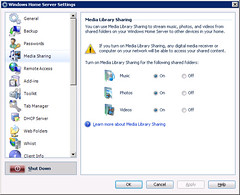
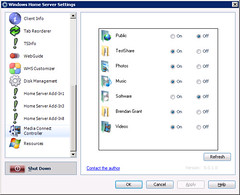
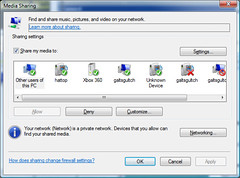
While the Home Server Console exposes the ability to share ones built in Videos, Music and Pictures shares using Windows Media Connect (WMC) (Microsoft's implementation of the Universal Plug and Play Audio and Video standards)... the Home Server UI falls flat if one wants to share digital content (via WMC) from even more shares or a custom another share with a a more appealing name (ie Tunes, Tunez, MP3z, etc instead of Music).

Compare the current settings page:

Media Sharing

With a test one I've created:

Media Connect Controller - Settings

Using a bit of the the undocumented bits of the Home Server Console, it is possible to exposing of a WHS share via WMC (to be written about another time) pretty easily... the question currently before me is how to expose this functionality to the average user?

  1. Do I want to stick with a standard settings page (as seen above)?
  2. Implement a whole new main console tab that displays a list of the shares and does nothing but let you enable/disable WMC for each?
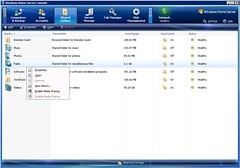
  3. Hook into the existing Shared Folders list and add a pair of menu items for enabling/disabling WMC:

Media Connect Controller - Shared Folders view

Any opinions?

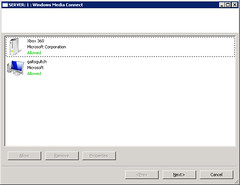
Ideally I'd also like this add-in to expose a bit of the functionality we see in Windows Vista or even on a tool hidden away on Windows Home Server for configuring which PC's can access the shared content... but that's a little ways off.

Existing tool on Windows Home Server:

Windows Media Connect - Configuration

Vista:

Media Sharing - Vista

Labels: ,

Wednesday, January 23, 2008

New Home Server Add-in: Tab Manager

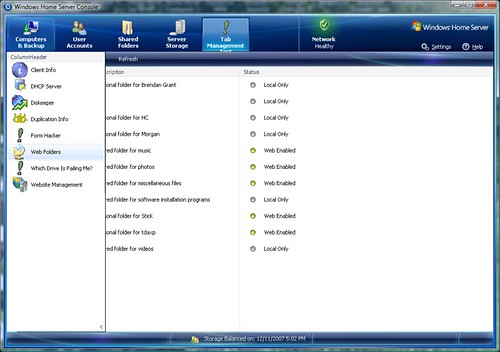
In yet another attempt to make the Home Server Console a little more manageable with regards to multiple tabs, Tab Manager allows a user to bypass the normal Home Server Add-in loading mechanism and display whatever tabs they want inside of another tab.

Say what?

Rather than having a cluttered tab tool bar full of lots and lots of add-ins:

Home Server Console - Lots of tabs

A user can offload the tabs they use less often to be only displayed:

Home Server Console - With Tab Manager

And after you've selected the tab you want, you can collapse the list:

Home Server Console - With Tab Manager - Hidden

All the while still making all of the settings pages in the Settings dialog (relatively) normally available:

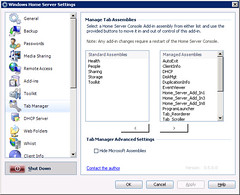
Tab Manager Settings

How it works

Existing readers of this blog will likely know that the Home Server Console looks for add-in tabs in assemblies with the following naming style: HomeServerConsoleTab.TabName.dll

By simply renaming those assemblies (ie HomeServerConsoleTab.SomeAddin.dll to HomeServerConsoleTab.TabManager.SomeAddin.dll), the add-in will no longer be loaded automatically by the Home Server Console and through the use of some code borrowed from Test Loader, are loaded instead by Tab Manager.

Aside from providing a new organizational home for the tabs, Tab Manager provides much of the same functionality as the Home Server Console with regards to tab ordering and ITabExtender (with the exception of ITabStatus support).

On the Settings side of things, Tab Manager's Settings tab uses ITabExtender to create a chain of custom settings tabs (using the Next property) to provide the Settings form access to the actual settings pages in a way that it expects/can handle.

In a later version I may offer a way to remove Settings tabs from view in a manner similar to... however I need to come up with reasonable way of doing this visually.

Warning

As is the case with (now) the majority of my add-ins, this add-in utilizes undocumented and unsupported mechanisms of Windows Home Server that could be misunderstood by me or change at any time possibly leading to a users Home Server no longer functioning correctly.

This add-in is by no means done and still is in need of some polish and is not advised at this time for wide spread use.

Please use caution with this add-in and use at your own risk.

If you are feeling daring and want to give it a try and offer feedback... please do.

If not, don't fret, the next version(s) will be even better thanks to those daring folks that tested out and gave feedback on earlier versions.

Usage

After you have installed the add-in...

  1. Launch the Windows Home Server Console
  2. Launch the Settings dialog
  3. Select the Tab Manager tab
  4. Select an assembly from the Standard Assemblies list and press the button with the Right arrow to move it to the Managed Assemblies list
  5. Repeat this process until all assemblies you want to be under the control of Tab Manager have been moved
  6. Press the OK button
  7. Click the Yes button to close the Windows Home Server Console
  8. Relaunch the Windows Home Server Console
  9. Select the Tab Manager tab
  10. Select desired tab from list.

Assemblies listed on the Standard Assemblies list are those that are automatically loaded by the Home Server Console, while those under the Managed Assemblies list are loaded by Tab Manager instead. Moving assemblies between the lists is as simple as double clicking on the item, or single clicking and using the appropriate button to move it.

Uninstalling this add-in does not automatically rename the modified files back to their original names. This is something I am looking into for the next version, in the mean time if/when you do decide to uninstall this add-in, you will need to add the desired files back to the Standard Assemblies list.

Note: No file name changes are made until the settings are applied through the use of the OK or Apply buttons.

Known issues

  • Tab Reorderer is unaware of tabs loaded through Tab Manager and can result in not all tabs being displayed on it's list or even phantom tabs without icons.
  • If loaded through Tab Manager, Tab Scroller still functions however it does not remove it's own icon.

Both of these issues will be resolved in a later version that will include the functionality of Tab Reorderer and Tab Scroller being added natively to Tab Manager (and reduce my add-in count from 5 to 3).

  • Any add-in that exposes status information (ie the main Microsoft tabs) will still work, however no status bar information will be displayed.
  • Some third-party add-ins that expect a given assembly name may not be able to load/save their settings.
  • Non-English systems may have issues loading the correct language for localized add-ins.

Downloads

Labels: ,

Wednesday, January 16, 2008

Coming Soon: Tab Management

Last month I mentioned a proof of concept add-in I was working on to change the way a user looks at some of the tabs in the Home Server Console.

I'm pleased to say that this add-in still proceeds (granted fairly slowly over the last month) and with any luck will be available in an early form before too long.

It works quite well today... only it needs a little more polishing, eye candy (not to mention a fair bit more testing) before I'll make it available.

The current build gives a better look when expanding and hiding the secondary tab list.

Expanded:

Tab Management - Main View

Hidden:

Tab Management - Hidden

Part of the delay was figuring out a good way to not display tabs in the main console view... but still make them available in the Settings panel:

Tab Management - Settings

A bit of work remains with regards to preserving existing tab order (on both sides) as well as other general sorting.

Labels: ,

Tuesday, January 15, 2008

Amazing New Add-in: Disk Management

After first seeing the announcement of Sam Wood's new Disk Management add-in I cursed at being beaten out of the door with a tool to help a user figure out which drive is which in their Home Server Console as my attempt kept getting pushed back due to other priorities.

Then I used it... and was thrilled, and floored.

Not only does it provide a fairly nice user interface, it also includes some undocumented functionality for adding and removing disks making it (in some parts) a replacement for the Storage Management tab.

Great job Sam!

Links:

One other fairly impressive thing about this is that Sam isn't just a WHS add-in author... but also a blogger on the subject of 4GW (4th Generation Warfare).

(Take a look at this this quick post from my buddy Dan (aka tdaxp) for a quick primer on the generations of warfare)

Part of what makes the subject so interesting (as well as the talk of 5GW) is that many of it's implications also have parallels in software development with regards to overall agility of strategy and resources.

Labels: ,

Tuesday, January 08, 2008

WHS Idea: Silverlight Uploader

After the announcement of Power Pack 1, on10 posted an interview yesterday with Windows Home Server Product Planning Manager Todd Headrick discussing it and it's relation to overall Home Server development (ie it sounds like PP1 will be alone for the time being and focus will move to the next major version)

One of the discussed features was the new that the new upload mechanism that borrows code from the Windows Live SkyDrive team and their upload mechanism... which is currently only supported on IE6 and IE7.

Granted I'm a IE7 user... I'm rather surprised to see that there is no similar option for Windows based FireFox users... let alone the half a dozen Macintosh users out there or that one Linux guy in the corner thinking he's not alone.

Then it hit me... how soon until something similar based on Silverlight?

I've little doubt that after the final 2.0 release and it's itty bitty CLR that the Home Server Team will support Silverlight it in one way or another either in the current or a future version of Windows Home Server... but why should that stop some clever third party developer who wants to create that add-in that supports the current alpha code (or upcoming beta code).

No... that developer wont be me. I've got a couple other things on my plate before I sit down to learn Silverlight.

Labels:

Monday, January 07, 2008

Windows Home Server Power Pack 1

As you already now know, the Windows Home Server team has announced Windows Home Server Power Pack 1.

I like this... big time.

Not only does it mean that the long awaited 64-bit connector software will soon be ours (soon being sometime during the vague 'first half of 2008'), but also that Windows Home Server is not a normal product that you buy and get bug patches for... but is also one that (in theory) Microsoft will be extending over time as well (granted, Power Pack 1 could end with a similar fate to Quake II Netpack 1: Extremities (ie being the only pack)).

As useful as 64-bit support (for my Media Center box) and the other added features will be, I think the most important part of PP1 (for me) is going to be the ability (or at least a mechanism to attempt) to prepare a corrupted backup database as I've had plenty of issues with this (I still suspect them to be hardware related) and the only way to resolve the error is to completely wipe out all backups or the entire WHS.

Labels:

Thursday, January 03, 2008

Multiple OEM Home Server Tabs

The Windows Home Server Console reserves the left most tab position to a tab supplied by the OEM who builds the actual Windows Home Server... such as what is seen in the HP MediaSmart server:

mediasmart-server

Did you know that you can specify your own?

It's simply a matter of breaking out the HomeServerConsole.exe.config file on the server and specifying an appSettings key and value based on the name of the tab in question.

For me to set my Web Folders add-in to show up as the OEM tab my config file could be as simple as this:

<?xml version="1.0" encoding="utf-8"?>
<configuration>
    <appSettings>
        <add key="Web Folders" value="1" />
    </appSettings>
</configuration>

Once done the third party tab you've specified will show up in the OEM position:

Web Folders as OEM Tab

Did you know that you can specify more than 1 OEM tab?

Just use the same trick in the config file... only do it again for other tabs:

<?xml version="1.0" encoding="utf-8"?>
<configuration>
    <appSettings>
        <add key="Web Folders" value="1" />
        <add key="DHCP Server" value="1" />
    </appSettings>
</configuration>

DHCP and Web Folders as OEM Tabs

Just remember that when two tabs have the same numerical value, their display names are used to sort them alphabetically.

Labels:

Sunday, December 30, 2007

How many tabs is too many?

Ever wonder how many console tabs the Windows Home Server Console can display?

So did I... so I built a few extra projects and deployed them to my Home Server:

Projects Dir

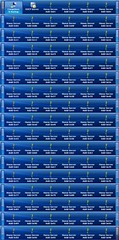
The answer is... 100 and believe it or not... that's a bad thing!

100 Tabs

As much as I would like to see such wide spread WHS development that there were 100+ add-ins to choose from... it'll likely be a long while before we see anything like that ... it's also probably unlikely that when that day happens very many people (if any) will install that many add-ins... but for those that do an obvious problem will hit them hard... some tabs not being displayed.

Look again at the above image of all of the tabs being scrolled through. Missing a few important things isn't it?

When tabs are loaded, the assemblies they are contained within are loaded in alphabetical order and once the limit is reached, no new tabs are added to the Console and only warnings are added to the event HomeServerConsole log file:

[1]071230.131656.5468: Init: Error: Too many tabs - extra is ignored
[1]071230.131656.5625: Init: Error: Too many settings - extra is ignored
[1]071230.131656.6562: Init: Error: Too many tabs - extra is ignored
[1]071230.131656.7031: Init: Error: Too many settings - extra is ignored
[1]071230.131656.7656: Init: Error: Too many tabs - extra is ignored
[1]071230.131656.8906: Init: Error: Too many settings - extra is ignored
[1]071230.131657.4218: Init: Error: Too many tabs - extra is ignored
[1]071230.131657.6250: Init: Error: Too many settings - extra is ignored
[1]071230.131657.7031: Init: Error: Too many settings - extra is ignored

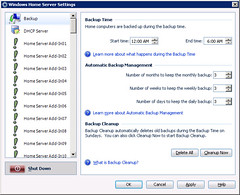
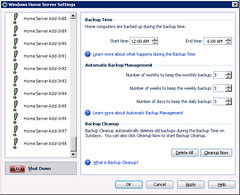
This is an interesting non-graceful failure as it is very possible that after a user adds too many tabs to their Home Server Console... they will not be able to easily remove an add-in or two to bring them back under the 100 tab limit using the Add-ins Settings page as they ordinarily would as it is very possible that it would be one of the first victims of this limit... after all it is located in the HomeServerConsoleTab.Storage.dll assembly which is pretty late in the alphabet

For reference, here is how the same non-graceful failure appears in the Settings dialog:

Settings - Start

Settings - End

Labels: ,

Thursday, December 13, 2007

WHS Dev Tips: Correction

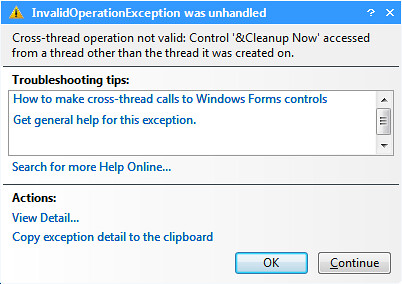
On Monday and Tuesday I made a horrible mistake in the two part WHS Dev Tip on remote and local debugging as I completely forgot about the static Control.CheckForIllegalCrossThreadCalls property that can be used to get around debug time exceptions such as this one:

Invalid Operation Exception

Both tips #9 and #9.5 have been updated to reflect this new information and to make working with Express sound less full of doom and gloom.

I must admit that until very recently... I didn't know about this property as I had no need for it. When I'd have an issue with an illegal cross thread operation in my code, I'd fix it as I'm quite anal about fixing easily reproduced bugs and not just suppressing them.

None the less the underlying problem that lead to my initial statements of doom and gloom are still accurate... the Home Server Console is doing some illegal cross threading, something that really should be fixed.

Labels: , ,

Tuesday, December 11, 2007

Proof of concept add-in: Tab Management

Part of the reason I created Tab Scroller was that at times I just have too many tabs to deal with in the Windows Home Server Console and today I came up with another method of dealing with large numbers of them... a Tab Management tab.

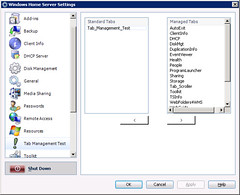
What does it do? It is a tab itself, which in turn loads a specified group of add-ins itself instead of having the Home Server Console do so (via renaming of the files) and then displaying the appropriate control when the desired one is selected from the presented list box:

Tab Management Test

The amazing thing about this add-in... is that it doesn't do any crazy hacks the way Tab Reorderer or Tab Scroller do.

Unfortunately this add-in is just a proof of concept test right now and is not something I'm likely to release anytime soon... largely because I can't decide on a good way to display the settings in the Settings dialog (something I am responsible for in order to make the main form work the way it does).

I figure though that this will be a good place to add the functionality of Tab Reorderer and Tab Scroller in once it does see the light of day and users.

Labels: ,

Monday, December 03, 2007

Relaunched: BrendanGrant.com

After owning the name domain for more than four and a half years... at last, there is now actual, useful, honest to goodness content!

And no... there are no links related to the cobuyitaphobia wars (in which I was victorious).

Despite the frequency of Windows Home Server related postings on this blog, it can be far too difficult to navigate through the strange political and social rants, calling attention to the enemies of free speech, porn and strange photo shows.

With that I've now just finished the Brendan's WHS Dev Site which is hosted on BrendanGrant.com and currently simply links back to posts here and organizes things far better than I could have here.

Over time I will endeavor to expand it into a more general WHS Development page, hosting and linking to content elsewhere... so long as other folks get into the Home Server development blogging.

Labels: ,

Sunday, December 02, 2007

"lick here for details"

Aside from giving me a good bit of motivation, there is another up shot it seems of having a homemade Home Server that likes to screw up on me from time to time... it helps me find errors like this one that ideally very very few people ever see:

Click here error

What's even more odd... is that the link takes the user here. Not really a place that is of much use in such a condition.

This issue has now been submitted as a suggestion/bug over on Connect.

Labels:

Updated: Tab Reorderer

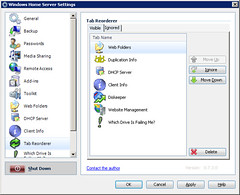
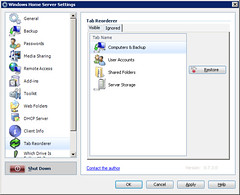
In addition to the earlier update of Web Folders 4 WHS, Tab Reorderer has also now been updated to provide the inclusion of the actual tab icons and offers a way to to both remove given tabs from the list (adding them to the Ignored list), but also move them back to the visible list.

Visible List:

Tab Reorderer - Visible Tab

Ignored List:

Tab Reorderer - Ignored Tab

This new build includes a whopping 5 buttons whose functions have changed slightly, they are now:

  • Move up: Moves tab up in tab order
  • Ignore: Add’s tab to Ignored list, recommended for Microsoft/OEM tabs
    Move Down: Moves tab down in tab order
  • Delete: Deletes the tab from the Visible list (but not from the application if present) and from the underlying configuration file. This button is intended for removing add-ins from the list that have been uninstalled but still show up in this list due to earlier reordering.
  • Restore: Moves tab from Ignored list to Visible list

This will likely be the last release of a stand alone Tab Reorderer add-in as I'm seeing a future for it's inclusion, along with Tab Scroller and a couple of other back burner ideas into a Tab Management add-in.

Download: Tab Reorderer

Labels:

Friday, November 30, 2007

If I were a smart man...

If I were a smart man... I'd stop using my Windows Home Server.

The PC I've built to act as my WHS is one monster of a frankenpc.

Inside it is an old Asus A7N8X Deluxe motherboard that was retired from normal use a few years back after it was no longer stable enough to run certain 3d games despite a great deal of driver work.

The CPU for some reason (when plugged into this board (despite large amounts of tweaking) insists on running at only 1.1 Ghz, despite being clocked by the factory for 2.2 Ghz.

The SATA controller was the cheapest I could find whose drivers I later found officially only support 2000 and XP and with some jury rigging seem to work in 2003/WHS.

Not the best combination... but it seems to work, mostly.

If I were a smart (and rich) man I'd buy some better supported hardware, or even an official Windows Home Server box.

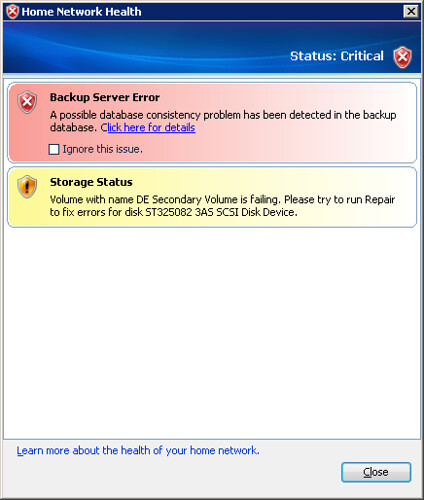
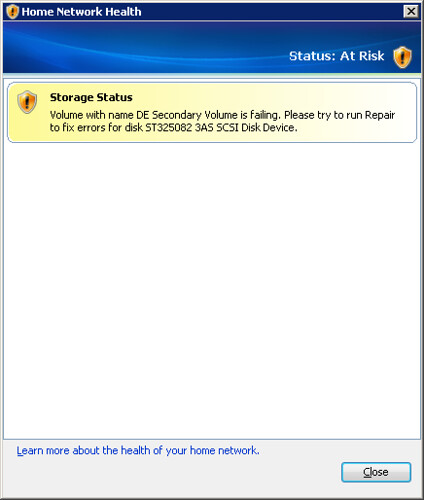
This evening I my Home Server greeted me with this warning:

Health Warning

Believe it or not, this is something I've seen before and is usually the precursor to the drive extender blowing up on me and eventually leading to data loss.

As yet I've been unable to diagnose exactly why this happens or what piece of hardware or software (likely driver) is to blame.

That ends.

So much of what I've done with Windows Home Server has been about making tools that work well for me, that make it an even better product for me, and if other people have benefit of my add-ins, so much the better.

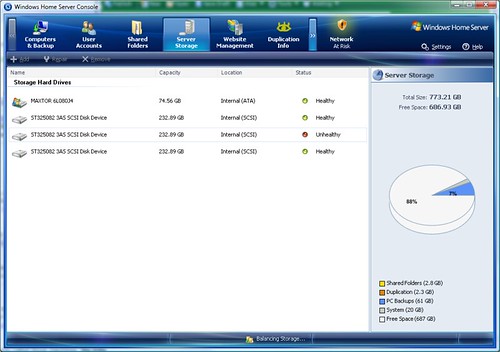
This latest volume error has lead me to sit down and start work on yet another tool, in the hopes of better diagnosing this kind of error. Not just informing the user that an issue exists, but helping them identify which disk drive, connected to which controller, something that is of vital importance to people like me with multiple identical drives:

Unknown Failing Disk

Sure, the Console says one is failing, but IDiskInfo.Status doesn't.

If I were a smart man, I'd just quit working with Windows Home Server, quit writing code that hurts my hands, quit investing so much time and energy into itty bitty cases that Windows Home Server can encounter, cases that Microsoft didn't deem important enough (or have sufficient time) to include in a v1 product, things that while possible to do manually require a fair bit of behind the scenes work and knowledge, functionality that should be a single button in the Home Server Console.</rant>

... if I were a smart man.

Labels:

Updated: Web Folders 4 WHS

Today I am making available the latest build of Web Folders 4 WHS (version 0.6.2) which is largely a cosmetic upgrade from the previous version (version 0.6.0) and includes some new eye candy for more easily identifying folders and whether they are web enabled or not:

WebFolders4WHS 0.6.2

In addition, an updated Instructions document has been created with removal guidance as well as some information on how to manually remove everything configured by the add-in in the unlikely event (something that has not been encountered yet) that the add-in and it's configuration cannot be removed using the suggested method.

The Dreaded Warning

After being greeted with this warning in the previous version:

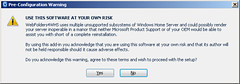
WebFolders4WHS Warning

some became worried about the stability of my add-in and what it could do to their system.

I want to make clear that as yet I have received no reports of data loss, reduction of system stability or performance, famine, flood or death as a result of the use of this add-in. Despite that, this add-in still relies on a number of unsupported Windows Home Server sub-systems (but supported portions of the Windows Small Business Server which serves as the basis for WHS) and simply exists as a warning of that.

At a later date I will replace the current warning with a less intrusive one.

Upgrading from Previous Version

Any users using the initial release of this add-in are advised to uninstall the previous version, download the new one and install it.

You are NOT required to remove the previous configuration prior to this upgrade.

Without further delay, the files:

Note that Software Update for Web Folders (KB907306) is still required on client machines if not already installed.

Labels: ,

Thursday, November 29, 2007

WHS Question: Resizing the Home Server Console

In response to a recent blog comment/question on if it is possible to resize the Home Server Console... the answer is yes... but it's almost worthless.

With a little bit of hackery (ie not through the normal interface) it is possible to resize the Home Server Console form to a smaller size, say 800x600, only it becomes clear that the form most of the add-ins out there were never written to do so:

ConsoleResize

The above picture is the Console running on the server itself, if you actually run it from the client you can easily resize the console, but not the parent window with out some hacking on both the client and server where you end up with this:

ConsoleResizeClient

So still no real benefit.

Some add-ins (like Web Folders 4 WHS) actually do resizing, however they are rare, largely because such functionality is basically worthless at this time because the larger application doesn't support it.

ConsoleResizeWebFolders

So to answer your question Ryan... it is possible, however there is no advantage to doing it today, maybe in V2.

Labels: